Optimize and align
Understand the optimization score
On this page
The optimization score measures how much you could gain by improving a process. It goes from 0 to 100. A higher score means more opportunity: more manual work, more tools, more waiting, more risk. It is not a quality grade. A well-run but heavy, manual process can score high, and that is exactly the point: it is a good candidate for improvement.
Five signals
UrbaHive computes the score of each process from its steps and its monthly volume. Five signals, each between 0 and 1, are weighed and added up.
The five signals, their weights, the formula and the three colour bands.
| Signal | Weight | How it is measured |
|---|---|---|
| Manuality | 35% | The average execution mode of the steps: Manual counts 1, Semi 0.5, Auto 0. |
| Fragmentation | 25% | The number of distinct applications used by the steps, counted up to 10, divided by 10. |
| Volume norm | 20% | The process's Volume / month divided by the 95th-percentile volume of your organization's processes, at most 1. Your busiest processes get close to 1. |
| Wait ratio | 10% | The total wait time of the steps divided by their total duration plus wait time. |
| Knowledge risk | 10% | The share of steps held by exactly one R, with nobody Consulted (C) or Informed (I). |
The formula
Score = 100 × (0.35 × Manuality + 0.25 × Fragmentation + 0.20 × Volume norm + 0.10 × Wait ratio + 0.10 × Knowledge risk), rounded to a whole number.
A process without steps scores 0, and its editor shows no gauge.
Read the colours
| Score | Colour | Label in the app |
|---|---|---|
| Below 35 | Green | Low opportunity |
| 35 to 59 | Amber | Moderate opportunity |
| 60 and above | Red | High opportunity |
A worked example
Take a process of four steps: two Manual, one Semi and one Auto (Manuality 0.625), three applications (Fragmentation 0.3), a volume at the organization's 95th percentile (Volume norm 1), 180 minutes of work and 60 of waiting (Wait ratio 0.25), and two of the four steps held by a lone R (Knowledge risk 0.5).
Score = 100 × (0.35 × 0.625 + 0.25 × 0.3 + 0.20 × 1 + 0.10 × 0.25 + 0.10 × 0.5) = 56.9, shown as 57: Moderate opportunity.
Where you see it
- The Score column of the process catalog, as a coloured bar you can sort on.
- The gauge at the top left of the editor. Hover it to see the five signals as percentages. It updates as you edit the steps.
- The Optimization page and the dashboard, which show the average over all processes, weighted by their monthly volume.
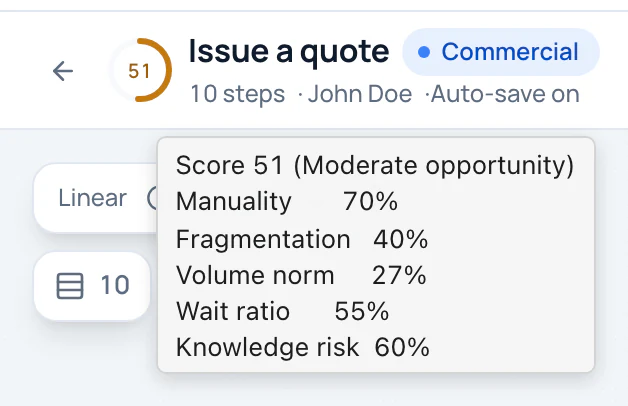
The gauge of Issue a quote in the example: hover it to see the five signals behind its score of 51, a moderate opportunity.
- Score of this process
- The five signals behind it
What moves the score
- Automate steps. Turning a Manual step into Semi or Auto lowers Manuality.
- Use fewer tools for the same work. Fewer distinct applications lower Fragmentation.
- Cut waiting time. Shorter waits between steps lower the Wait ratio.
- Share the knowledge. Adding a Consulted or Informed person to a step held by one person alone lowers Knowledge risk.
Step durations count in the score only through the Wait ratio. They weigh much more in the hours shown on the Optimization page. The Value added of a step (Value-added, Non value-added, Control) is not counted at all.
Tip
Fill Volume / month for every process and the durations of the steps. Without them, the score and the Optimization page say little.
Related pages
- Find what to automate: the Optimization page.
- Describe a step: execution mode, applications, time and RACI.
- Create or edit a process: the Volume / month field.