Optimize and align
Find what to automate
On this page
The Optimization page sums up the health of all your processes: where the effort goes, which steps are worth automating first, and which processes carry a risk. Open it from the sidebar: Process › Optimization. Its subtitle reads "Optimization and health of your processes". Everyone in the organization can see it.
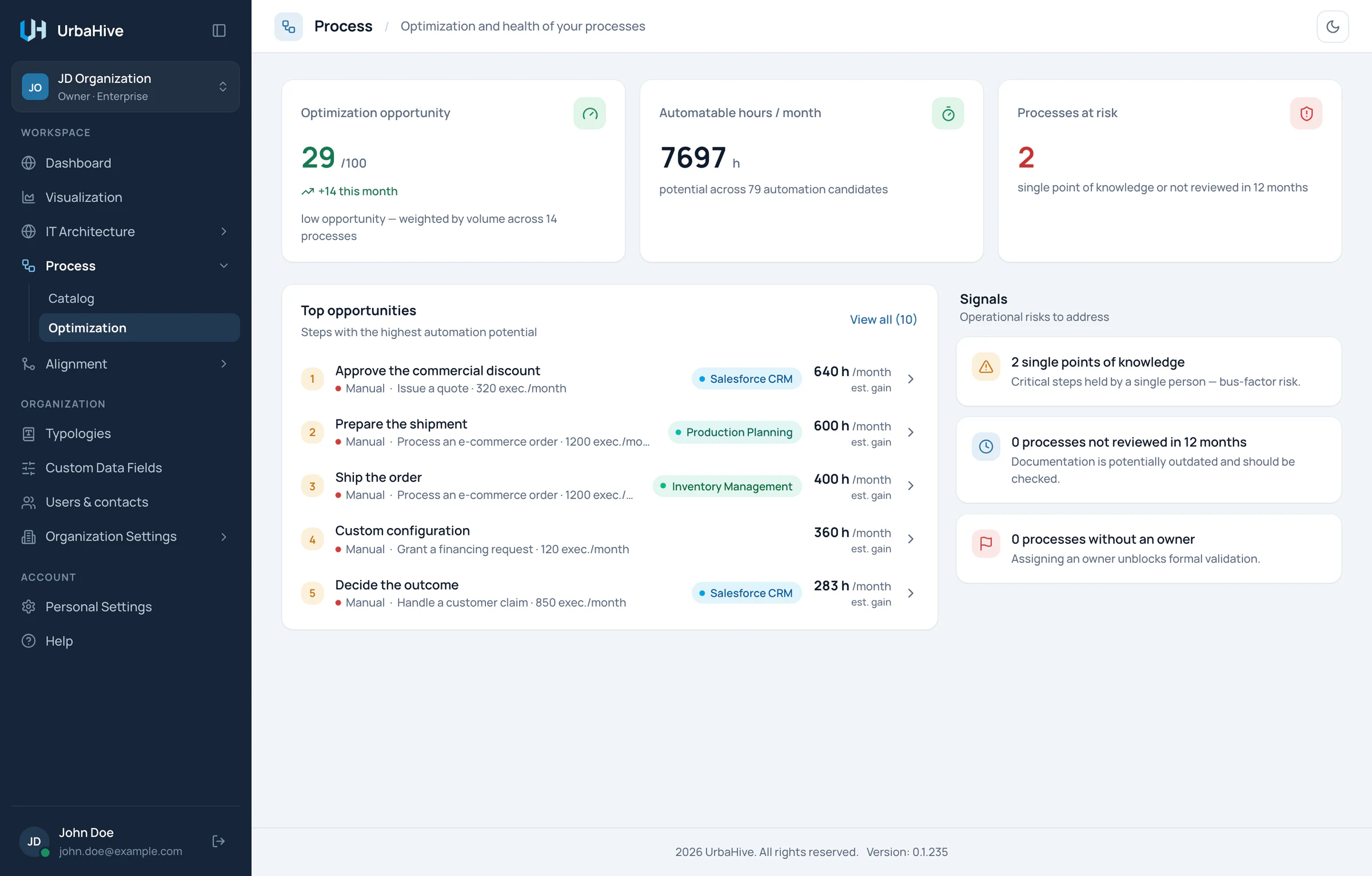
The Optimization page of the example organization: three indicators, then the top opportunities and the signals.
- Optimization opportunity
- Automatable hours per month
- Processes at risk
- Steps worth automating first
- Signals: risks to address
The three tiles
| Tile | What it counts |
|---|---|
| Optimization opportunity | A score out of 100: the average of the scores of all your processes, weighted by their Volume / month. A busy process weighs more than a rare one. "+N this month" counts the processes created this month. See Understand the optimization score. |
| Automatable hours / month | The hours of work that automation could take over each month. For each step: its average duration × the process's monthly volume × a mode factor (Manual 1, Semi 0.5, Auto 0), added up and turned into hours. The automation candidates are the steps that are not Auto yet and have both a duration and a process volume. |
| Processes at risk | "single point of knowledge or not reviewed in 12 months": the processes that have at least one of the two problems described under Signals. |
Top opportunities
The card lists the "Steps with the highest automation potential", ranked by monthly volume × mode factor × duration. Each row shows:
- its rank and the name of the step;
- its execution mode, then the process and its volume ("… · N exec./month");
- the first application the step uses;
- the estimated gain, in hours per month ("N h /month est. gain").
Click a row to open its process in the editor. The card shows five rows. When there are more, View all (N) shows up to ten, and Show less folds the list back.
If the card says "Set process volumes and step durations to surface the best automation candidates.", the processes lack a Volume / month or their steps lack an Average duration (minutes).
Signals
The Signals card lists "Operational risks to address":
- single points of knowledge: "Critical steps held by a single person — bus-factor risk." A process counts when the same single person is the R of all its steps that have an R (at least two of them), and nobody is Consulted or Informed anywhere in it. If that person leaves, nobody else knows the process.
- processes not reviewed in 12 months: "Documentation is potentially outdated and should be checked." The process has not been changed for more than a year, whatever its status.
- processes without an owner: "Assigning an owner unblocks formal validation." The process has no Responsible.
Act on it
- Click a top opportunity to open its process.
- Click the step, then change its Execution mode once it is automated, or add a C or an I to share the knowledge. See Describe a step.
- For a process without an owner, click Edit process and set its Responsible. See Create or edit a process.
The page reads the processes as they are now: come back to it after your changes to see the figures move.
Note
The figures are estimates built from what you entered: monthly volumes, durations and execution modes. They are as good as those values.
The same figures on the dashboard
The dashboard repeats the Optimization opportunity and the Automatable hours in its row of process figures. Its Top automation opportunities card lists the first five steps, and its See all link opens this page. See Read the dashboard.
Related pages
- Understand the optimization score: the score of each process.
- The process catalog: sort the processes by score.
- Describe a step: durations, modes and RACI.