Getting started
What UrbaHive is
On this page
UrbaHive is a web app where your organization maps its IT and its business processes, then sees how they connect. You record your programs, applications, data flows, servers and architecture documents. You describe your processes step by step. UrbaHive draws the map, scores each process and shows what a change touches. This guide is for IT architects, IT managers, project managers and business owners.
Watch the 4-minute product tour
The film walks through the main screens with demo data, in the order you will meet them.
The 4-minute tour: the dashboard, the map, application records, processes, optimization, the coverage matrix, impact analysis, collaboration and the AI connector.
Five layers, one map
UrbaHive keeps four layers of your organization in one place, from the business down to the machines. People sit across all of them: they are responsible for elements and hold roles on process steps.
Business, functional, applicative and technical layers, with people across them. Impact analysis uses the same colours.
Each layer has its own pages in the sidebar. The links between layers are what make the map useful: a process step uses applications, an application supports a capability, an application runs on a server.
What you can do
- Map your IT and see it drawn. Record programs, applications, flows and servers, then open the map (Visualization in the sidebar). See Explore the map.
- Document your processes. Draw each process step by step, with who does what (RACI), the applications used and the time spent. See Build a process in the editor.
- Find what to automate. Each process gets an optimization score, and UrbaHive lists the manual steps that cost the most hours. See Find what to automate.
- Align the business and the IT. Check which applications support each capability in the coverage matrix, and see what a change touches with impact analysis.
- Work as a team. Invite colleagues with the right role, and follow every change in the audit log.
- Ask Claude. Connect the AI assistant so it can read your map and, if you allow it, update it. See What the AI assistant does.
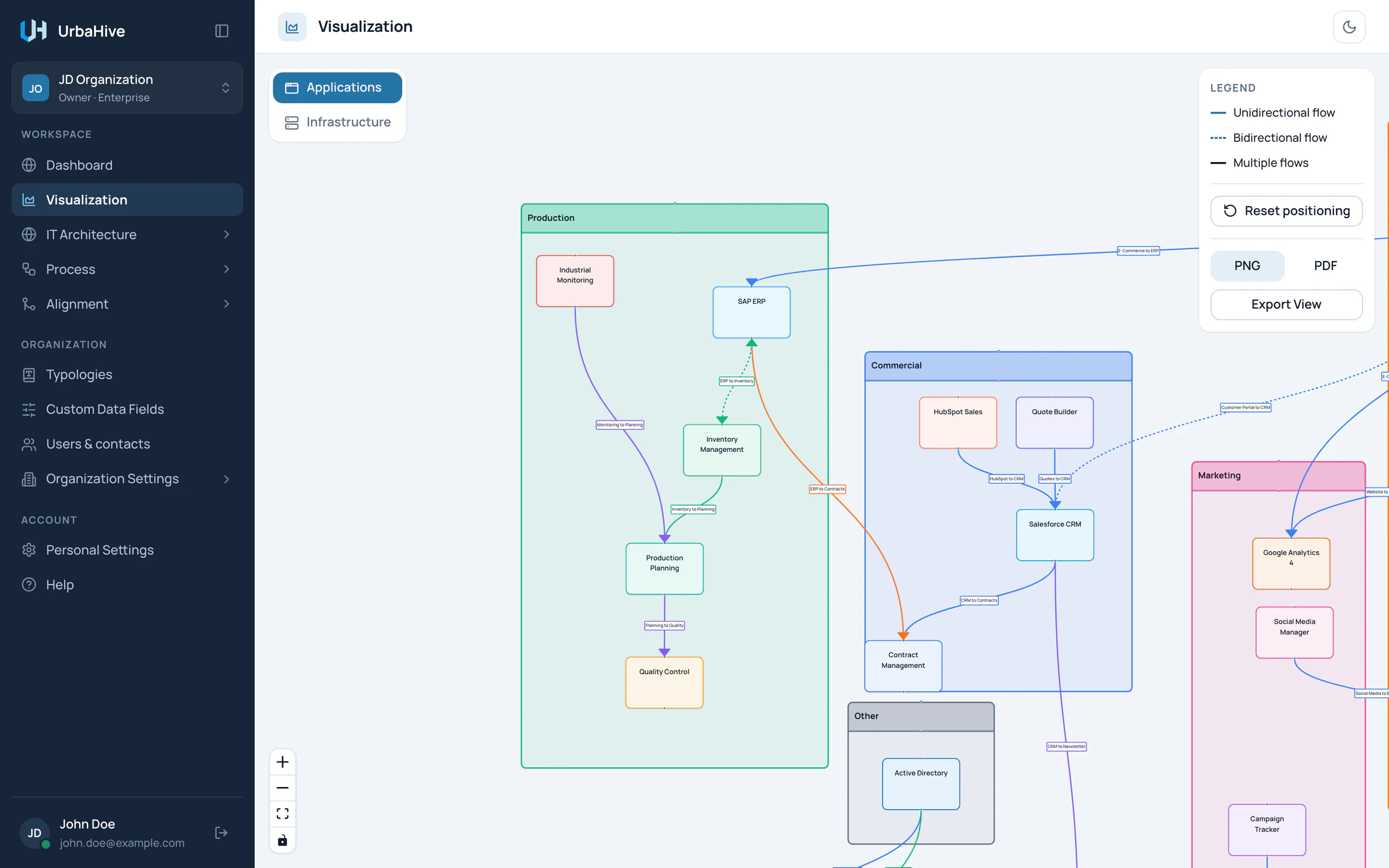
In the example, the map draws each program as a frame, each application as a box and each flow as a labelled arrow.
- Program: click its name for details
- Application: click for details
- One-way flow with its name
- Two-way flow (dashed)
Everything lives in an organization
Your data belongs to an organization. Everyone in it works on the same map. The window that switches between organizations calls them workspaces: it is the same thing.
You can belong to several organizations, with a different role in each. Your role there (Owner, Editor, Member or Viewer) decides what you can change. See Roles and permissions.
Hosted or on your own servers
UrbaHive runs as a hosted service at app.urbahive.com. Some organizations run the on-premise edition instead, installed by their own IT. The product is the same. A few things differ, such as creating an account yourself, plans and the AI connector. See Hosted and on-premise.
Where to go next
- Create your account and sign in: the ways to get in.
- Your first steps: the order to build a useful first map.
- Find your way around: the sidebar, the header and the theme.